
What is AI SLR?
AI SLR stands for Sign Language Recognition, where your computer can turn ASL into English. You can sign into a camera, and the AI will translate your sign.
How is your data stored?
All customer data and application processing are hosted and done within Amazon Web Services (AWS) infrastructure. Data stored by Sign-Speak is encrypted. They maintain administrative, technical, and network safeguards designed to protect customer data during transmission, processing, and storage.
Instructions
1. Start your recording
Turn on your camera and begin signing your response in ASL.
2. Include key details in your signing
-
First and last name
-
Email address
-
Reason for support
-
Product you’re referring to (e.g., Convo Now, Convo for Zoom, etc.)
3. Let the AI generate your response
Once you finish signing, the system will convert your ASL into English text automatically.
4. Review and edit
Before submitting, carefully review the generated text and fix any errors or missing details.
5. Submit your feedback
Once everything looks correct, submit the form.
Tips & Tricks
|
|
|
|
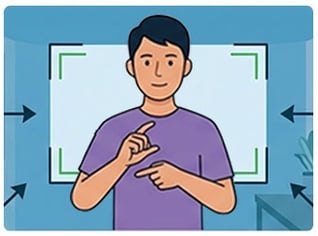
Sit Up and Frame Yourself Sit up straight so the camera can see your face, hands, and upper body. For the best results, do not lie down while you are signing. |
Stay in the Center Make sure you are in the middle of the camera frame and facing the camera directly. Our AI works best when you are the focus of the video. |

|
|
|
|
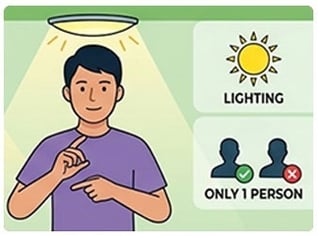
Keep the Video Clear Good lighting is very important. Make sure the room is bright, and there is no glare on the screen. Also, make sure you are the only person in the view of the camera so the AI knows exactly who is signing. |
Use the "Rule of Thumb" A good way to check your setup is to think about a video call. If you were signing to a friend on your phone or laptop, set up your camera in the same way so they could see you clearly. |

Want to share your thoughts?
What do you think about the feedback form with AI SLR? Let us know via that feedback form, chat with us, or email us at support@convorelay.com