
Quick fix for T‑Mobile iPhone/iPad users when Convo won’t connect on LTE.
Apple released the latest version of the iOS platform, version 10.3, and it has come to our attention that T-Mobile customers will not be able to log into Convo iOS while on the LTE network. This issue does not affect your ability to use Convo iOS on WiFi.
There's a quick and easy fix! Follow the steps below:
Step 1: Force quit Convo Mobile by double-tapping the home button and swiping up on Convo Mobile.
Step 2: Click on this link, this will open a new page on your iPhone's browser. (Be sure to use it in Safari. It will not work in Chrome or Firefox browsers).
Step 3: On the new page, press Install.
Step 4: Enter your passcode (if you have one enabled)
Step 5: Press Install again to proceed with the installation.
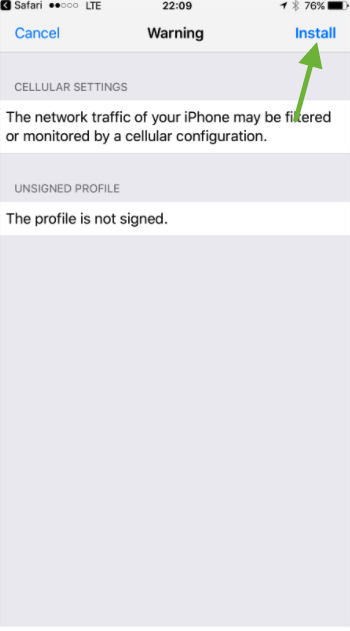
Step 6: Press Install at the bottom of the screen to confirm the installation.
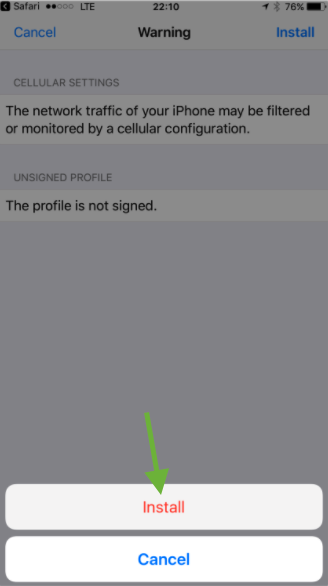
Step 7: Once installation is complete, press Done at the top-right corner of the screen.
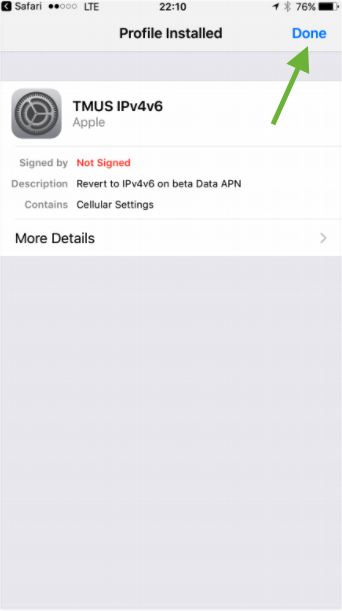
Step 8: Open your Convo Mobile, and you should be able to log in just fine!
Step 9: If not, try restarting your iPhone/iPad (power off, then back on, not sleep mode) after doing all these steps.

I tried everything, and nothing changed. Now what?
Chat with us via text or ASL here, or e-mail us at support@convorelay.com